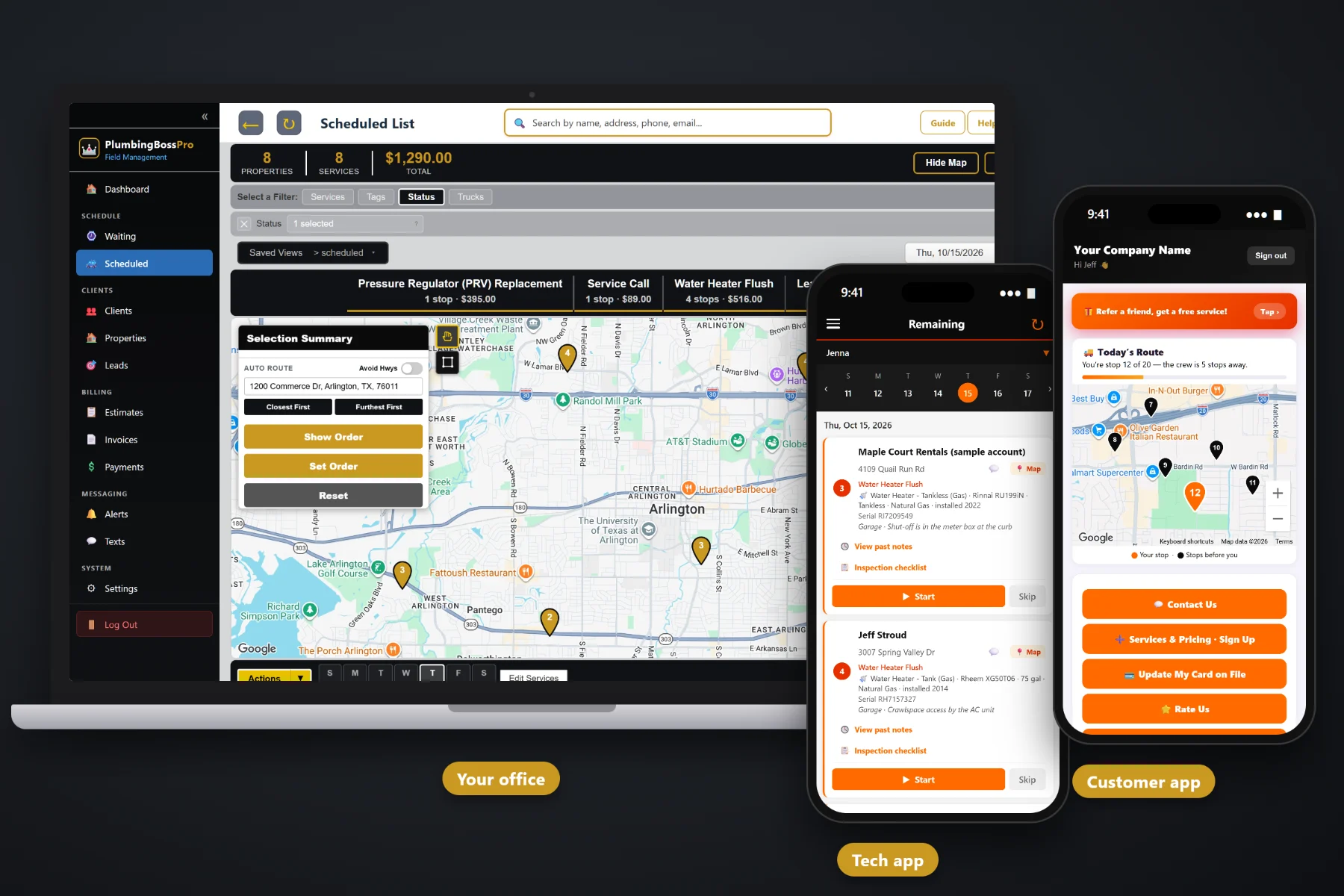
A plumbing company runs on details that are easy to lose: which water heater is in the garage, where the main shut-off is, whose flush is due this month, which restaurant needs its grease line jetted on Tuesday. PlumbingBossPro keeps the equipment on every house, puts service calls and recurring work on one Waiting List map, routes each van, sends every call to the tech's phone and bills by card on file or one monthly statement.
Plans start at $59/month and cover the whole job: the house and its equipment, the call, the van, the tech's phone, the customer's texts and the invoice. For the big picture of the platform, start at PlumbingBossPro, then read on for how each piece works in a plumbing shop.
Water heaters, softeners, sump pumps, well pumps, shut-offs and cleanouts with brand, model, serial, year and location.
Every service call and every recurring visit that came due, on one map, colored not due, due now and overdue.
Jobs by day and van, auto-routed Closest First or Furthest First from the shop, with printable route sheets.
The day's calls in route order with equipment, access notes, past notes, the inspection checklist and photos.
Night-before, on-the-way and arrived texts go out on their own, and the office can text customers back and forth.
Complete creates the invoice and can charge the card on file. Property managers and restaurants can get one monthly statement.
The first time you work at a house, somebody writes down the water heater's brand and size, where the softener sits and how to reach the main shut-off. PlumbingBossPro saves that on the house. Every later job fills in from it, and anything the tech changes on a job flows back, so the next plumber walks in already knowing what is there.
Most plumbing companies are an owner, a few techs and somebody answering the phone. PlumbingBossPro is built for that size: a few screens in the office, a few taps per job in the field, and a tech app that runs in the browser on the phones your plumbers already carry.
CSV import puts your customer list in and places each address on the map. Add equipment to houses as you go.
Service calls land as one-time jobs. Yearly flushes, softener service, backflow tests and grease-line jetting come due on their own.
Pick the day's jobs from the Waiting List, assign them to a van and auto-route from the shop, or set the order by hand.
Techs run the day from their phones. Complete creates the invoice and can charge the card on file.
Most field-service apps give a job an address and a notes box. A plumbing job is a water heater with a model and serial number, a shut-off in a meter box at the curb, a softener in the basement and a flush that is due again next year. Software that only knows the address leaves the rest on a clipboard.
Ask any small plumbing shop how the week really runs and you will hear the same story: calls written on a pad by the phone, a whiteboard with each van's day on it, and a tech standing in a garage calling the office to ask what size water heater they put in at this house four years ago. Whether the customer is on the yearly flush. Where the cleanout is. Whether the property manager wants this one on the monthly bill.
That information belongs on the house, not in one plumber's memory. When it shows up on the phone, any tech can take any call and the office stops digging through old invoices.
PlumbingBossPro keeps the customer, the house, the equipment and the job together, from the first call to the paid invoice.
Every tool here is aimed at the same goal: fewer calls back to the office, fewer trips back to the supply house for the wrong part, and fewer invoices that never get sent.
Water heaters, softeners, filtration, pumps, disposals, shut-offs, cleanouts and backflow preventers with full details.
One-time calls and repairs go on the Waiting List the moment they are booked.
Yearly flushes, softener service, backflow tests and grease-line jetting set by minimum days between visits.
A live map and list of every visit that came due, colored not due yet, due now and overdue.
Jobs by day and van, auto-routing from the shop, saved views and printed route sheets.
Company login plus personal PIN, calls in route order, navigation, notes, photos and Start / Skip / Complete.
Shut-off, pressure, water heater, T&P valve, drains, fixtures and readings, with a printable Plumbing Inspection Report.
Built from your service list, approved online by the customer, then turned into the scheduled job.
Two-way texting from the office plus automatic night-before, on-the-way and arrived alerts.
Customers see the route on a live map, request service, sign up for plans, update their card and pay.
Charge on completion or on a schedule, with invoices, sales tax and past-due follow-up.
One statement a month for a property manager or restaurant group, every line labeled with its address.
Bring in your customer list and the addresses are placed on the map automatically.
Office user roles, employees with PINs and van assignments, crew GPS on the office map.
Pulled from the same jobs, clients and invoices the office already works in every day.
Start $59, Pro $89 and Crew $199 per month, with unlimited customers, addresses and employees.
Most plumbing shops run two kinds of work at once: calls that come in today and want someone today, and maintenance that comes due on a schedule. PlumbingBossPro puts both on the Waiting List map. The office picks the day's jobs, assigns them to a van, and auto-routes Closest First or Furthest First from the shop, and each tech's phone shows the same order. A common setup is one van on repairs and drains and one on water heaters and maintenance. For a full walkthrough of how it all fits, read Plumbing Software: The Complete Guide for Small Plumbing Companies.
A homeowner waiting on a plumber wants to know one thing: when. Automatic texts the night before, when they are next and when the tech arrives answer that without a phone call. In the customer app they can watch the route on a live map, request service, sign up for a yearly flush plan, approve an estimate, update their card and pay an invoice. Replies come back to the office through two-way texting.
Pick the plan that fits your shop. Every plan starts with a 14-day free trial and no credit card.
Compare plans on the pricing page.
Residential service calls and repairs, drain cleaning, water heater installs and yearly flushes, softener service, backflow tests, and recurring work for property managers, landlords and restaurants with many locations. One-time calls and recurring visits live on the same Waiting List.
Water heaters (tank or tankless, gas or electric), water softener, whole-house filtration, sump pump, sewage ejector, well pump, garbage disposal, main water shut-off, sewer cleanout and backflow preventer, each with brand, model #, serial #, year installed, size, fuel or power, location and access notes. New jobs fill in from the house, and changes on a job flow back.
No app store download. The tech app runs in the browser on iPhone and Android and can be installed to the home screen. Techs log in with your company login and their own personal PIN.
Yes. A client set to Monthly gets one statement each month covering every address, with each line labeled by its address. Restaurants with several locations work the same way.
Yes. CSV import brings in your customer list, and the imported addresses are placed on the map automatically.
Start is $59/month, Pro is $89/month, and Crew is $199/month. Every plan starts with a 14-day free trial with no credit card.
This page covers plumbing software as a whole. For a tour of the full platform, from the first call to the paid invoice, see the PlumbingBossPro platform overview.
Practical reading on equipment records, service calls and recurring work, the Waiting List, dispatch, the tech app, inspections, estimates, texting, billing, monthly statements, setup, switching and choosing the right plan.
Equipment on every house, service calls and maintenance on one map, routes for every van, the tech app on every phone and payment at completion. Try PlumbingBossPro free for 14 days.