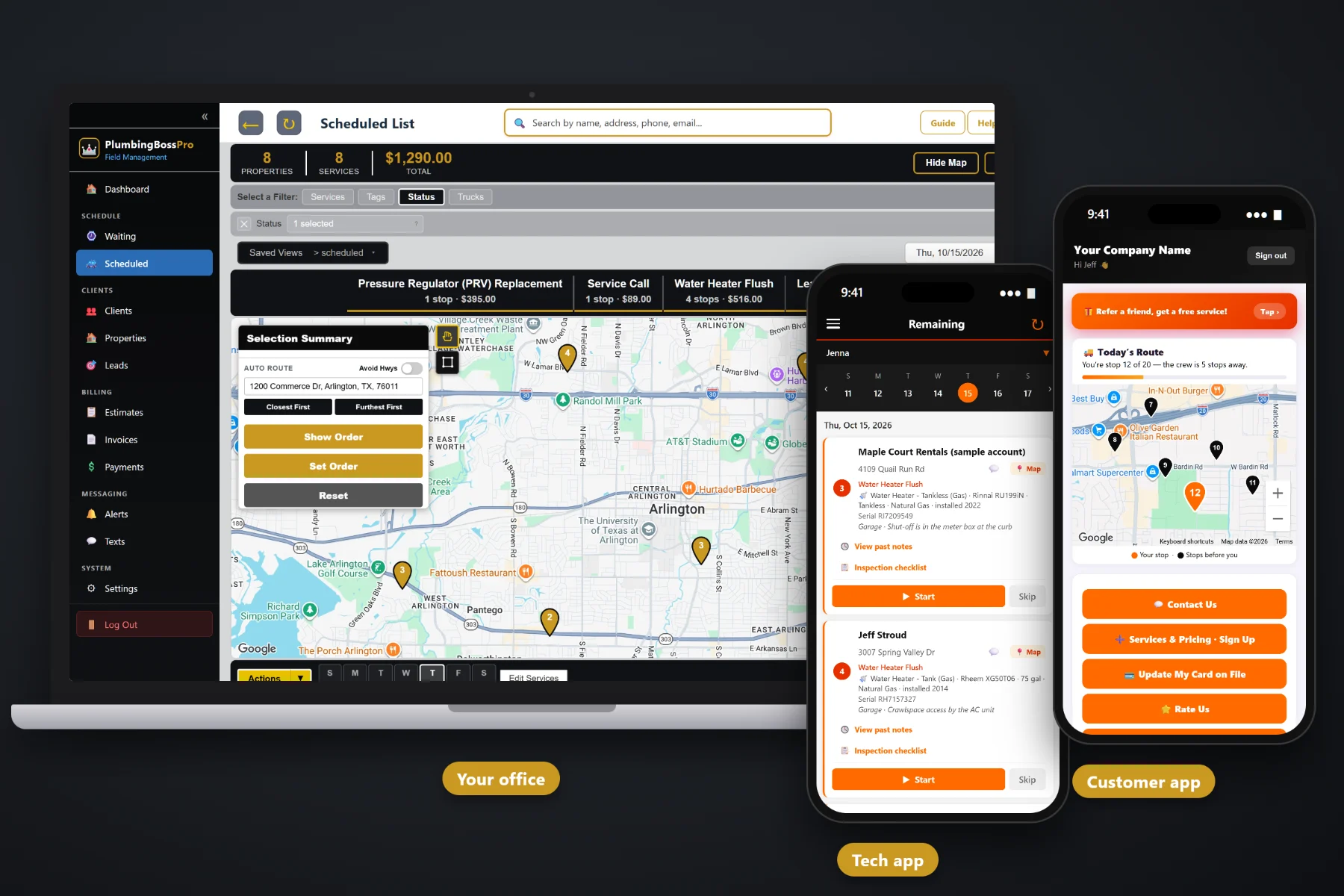
A plumbing day never goes the way it was booked. A dripping faucet at 8am, a water heater swap that eats the afternoon, and a backed-up sewer that calls in at 10:15 and needs a van now. PlumbingBossPro puts every call on a dispatch board by van and day, auto-routes Closest First or Furthest First from the shop, lets you set the order by hand, and sends the same order to each tech's phone, with automatic on-the-way and arrived texts to the customer.
Plans start at $59/month, and dispatch comes with every plan. The board, auto-routing, route order, saved views, printed route sheets, crew GPS and customer texts are part of the platform, not an add-on. To see how dispatch fits with equipment records, estimates, recurring work and billing, start at PlumbingBossPro and then come back here for the scheduling side.
Every scheduled call sits under a day and a van. Filter to one van and see exactly what that tech has in front of them.
Closest First or Furthest First from your shop address, then drag the order by hand where you know better.
Drop a burst pipe or a backed-up sewer onto the closest van and the tech's phone updates with the new stop.
See where each van is on the office map before you decide who takes the call that just came in.
On-the-way and arrived texts go out from the tech's phone. Customers see their place in line in the customer app.
Save the board views you check every morning and print a route sheet for any van and any day.
A plumbing dispatcher juggles three kinds of work: quick repairs that take under an hour, long jobs like water heater swaps and repipes that take half a day or more, and emergencies that cannot wait. PlumbingBossPro keeps them on one board, by van and by day, so you can see where the gaps are before you promise a customer a time.
Most plumbing offices are small. The person booking the calls is the same person answering the phone, sending invoices and calming down the customer whose basement is wet. PlumbingBossPro keeps dispatch to a handful of moves: put the job on a day, put it on a van, route it, and let the phones and texts do the rest.
Add employees with a personal PIN and assign them to vans: one on repairs and drains, one on water heaters and maintenance, or however you run.
Service calls, approved estimates and recurring visits from the Waiting List all go onto a day and a van.
Auto-route Closest First or Furthest First from the shop, then move a stop up or down by hand where it matters.
Each tech sees the same order on their phone, taps navigation, and the customer gets on-the-way and arrived texts automatically.
Plumbing scheduling breaks down the moment the day changes, and in plumbing the day always changes. A calendar shows who is booked. It does not show where the vans are, what equipment is at the next house, or how far the emergency is from the tech who just finished a faucet.
Ask any plumbing office how the schedule really runs and you will hear the same story: a whiteboard that was right at 7am, a dispatcher calling every tech to ask where they are, and a customer with no hot water who was told “sometime this afternoon” and has called back three times. Nobody knows which van is closest, so the emergency goes to whoever answers the phone first.
The fix is not a bigger whiteboard. It is a board that knows each address, each van's order and each tech's location, and that pushes changes straight to the tech's phone instead of waiting for a call back.
PlumbingBossPro keeps the call, the house, the equipment, the van and the customer in one place, from the first phone call to the paid invoice.
Every tool here exists to get the right van to the right house with fewer phone calls, fewer wasted miles and fewer customers wondering where you are.
The Scheduled List shows every job by day. Pick a day and see every van's calls on it.
Narrow the board to one van to check one tech's load before you add another call.
Auto-route a van's day from the shop address in either direction.
Move a stop up or down when a customer is only home after noon or a job needs to go first.
Push a job to tomorrow or pull one forward, and it leaves one day and lands on the other.
The tech sees the water heater, its size, fuel and location, plus shut-off and access notes, before arriving.
Recurring flushes, softener service, backflow tests and grease-line jetting appear on a live map when they come due.
Techs tap Skip and say why, so the office knows what to rebook.
Sent automatically from the tech's phone. Customers choose night before, when they're next and when the tech arrives.
In the customer app: "You're stop 12 of 20 — the crew is 5 stops away."
Every van shows on the office map, so the closest tech gets the emergency.
Save the board filters you use every day and open them with one click.
Print a van's day for the dashboard, the office wall or a backup.
iPhone and Android in the browser, installable, company login plus personal PIN.
Complete creates the invoice and can charge the card on file.
Start $59, Pro $89 and Crew $199 per month, with dispatch on every plan.
Most plumbing shops with two or three vans end up splitting the work by type: one van runs repairs and drain cleaning, short calls all day, and another runs water heater swaps, tankless installs and yearly maintenance. PlumbingBossPro handles that with a simple van assignment on each job and a filter on the board. Each van is routed on its own from the shop, and each tech sees only their own day. For the full walkthrough, read Plumbing Dispatch Software: The Complete Guide to Scheduling Service Calls and Running Your Vans.
The most common call a plumbing office gets is “when will the plumber be here?” Automatic texts answer it before it is asked. Customers can get a reminder the night before, a text when they're next, and a text when the tech arrives. The customer app shows today's route on a live map with their place in line. Replies come back to the office through two-way texting, and when the job is done the invoice, card on file and online payment are all in the same app.
Pick the plan that fits your shop. Every plan starts with a 14-day free trial and no credit card.
Compare plans on the pricing page.
Check crew GPS on the office map to see which van is closest, add the call to that van's day on the board, and move it up in the route order. The tech's phone shows the new stop in its place, and the customer can get on-the-way and arrived texts like any other call. Whether you bump a short call to make room is your decision.
Yes. Each job is assigned to a van, and the board can be filtered by van. Many shops run one van on repairs and drains and another on water heaters and maintenance, each routed from the shop on its own.
For a van and a day, auto-route orders the stops Closest First or Furthest First from your shop address. You can then set the order by hand, for example when a customer can only be home after noon or a water heater swap should go first.
Arrival windows are your own policy. Many shops promise a morning or afternoon window and rely on the automatic when-they're-next and on-the-way texts, plus the live route position in the customer app, to tighten it up on the day.
Recurring work is set by minimum days between visits, such as 365 for a yearly flush or 14 or 30 for restaurant grease-line jetting. When a visit comes due it shows on the Waiting List map, and you put it on a van and a day from there.
Start is $59/month, Pro is $89/month, and Crew is $199/month. Dispatch and scheduling are on every plan, and every plan starts with a 14-day free trial with no credit card.
Dispatch is one piece of how PlumbingBossPro runs a plumbing company. For equipment records, the tech app, estimates, recurring maintenance and billing, see the full PlumbingBossPro platform overview.
Practical reading on the dispatch board, booking service calls, same-day emergencies, routing, splitting vans, long jobs, customer texts, crew GPS, the Waiting List, skips, after-hours calls, route sheets and the daily dispatch routine.
A dispatch board by van and day, auto-routing from the shop, crew GPS, automatic customer texts and the same route order on every tech's phone. Try PlumbingBossPro free for 14 days.